Monitoring Colibri SDK Go with OpenTelemetry
· 2 min read

The Colibri examples include an OpenTelemetry Collector and Jaeger. This guide runs that stack and generates a trace through an HTTP request.
Prerequisites
- Docker with Compose;
- Go 1.26.2;
- Make.
Start the environment
git clone https://github.com/colibriproject-dev/colibri-sdk-go-examples.git
cd colibri-sdk-go-examples
make build
make start
The stack starts the example services, PostgreSQL, Redis, LocalStack, the OpenTelemetry Collector, Jaeger, and Prometheus.
SDK configuration
Each application sends data to the Collector over OTLP HTTP:
OTEL_EXPORTER_OTLP_ENDPOINT=http://otel-collector:4318
OTEL_SERVICE_NAME=school-module
Use the Collector base URL. The SDK appends /v1/traces and /v1/metrics.
Port 4318 is OTLP HTTP; port 4317 is normally used for OTLP gRPC and is not
the transport configured by this SDK version.
Generate a trace
Create a course:
curl --request POST \
  --url http://localhost:8080/public/v1/courses \
  --header 'Content-Type: application/json' \
  --data '{"name":"Course 001","value":100}'
Use the returned ID:
curl --request GET \
  --url http://localhost:8080/public/v1/courses/COURSE_ID
Open:
- Jaeger: http://localhost:16686;
- school-module API definition: http://localhost:8080/api-docs;
- finantial-module API definition: http://localhost:8081/api-docs.
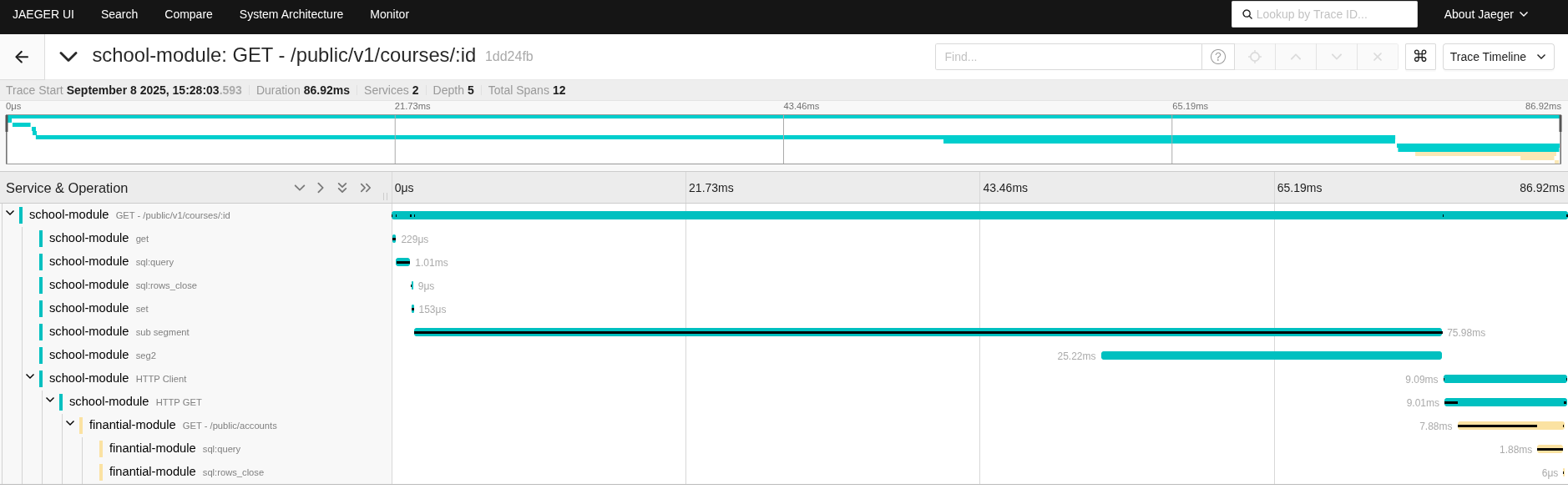
Select school-module in Jaeger and search for recent traces.
Operational notes
- keep
OTEL_SERVICE_NAMEstable for each service; - propagate
context.Contextacross layers; - avoid IDs, emails, tokens, and other high-cardinality or sensitive values in attributes;
- define sampling and retention in the observability platform for production.